Step 1: Ensemble Configuration
Enter the number of players for each instrument:
Woodwinds
Brass
Step 2: Select Sheet Music Folder:
Selected folder:
Choose the parent folder that contains a Pieces subfolder.
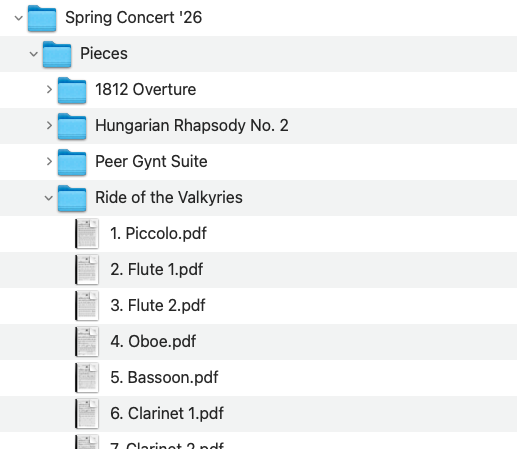
Use the concert folder as your parent folder (the one that contains a
Pieces subfolder). In the example below, the parent folder is
“Spring Concert ’26”. Inside it, there’s a “Pieces” folder,
and inside Pieces there’s one folder per piece (e.g., “Ride of the Valkyries”).
Then, inside each piece folder, you should have the PDF scan for each individual part
(Piccolo, Flute 1, Flute 2, Oboe, etc.).
Numbering the parts at the start of the file name, like "1. Piccolo.pdf"
instead of just "Piccolo.pdf" is optional but recommended.